Evaluating Fashlada Fashion Presentation for Professional Use
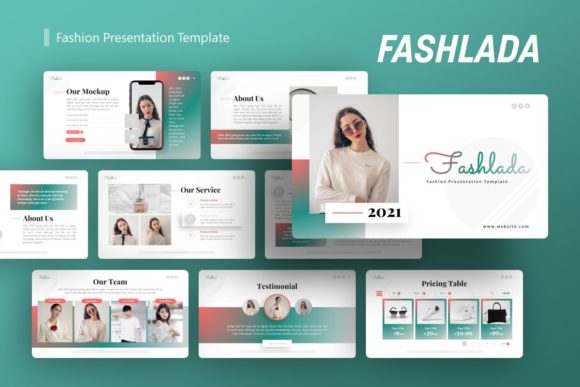
Selecting the right presentation template is a strategic decision that impacts how effectively information is communicated to stakeholders, clients, or potential employers. The Fashlada Fashion Presentation is designed as a versatile visual framework suitable for a wide range of professional applications beyond its namesake industry. While marketed with a fashion aesthetic, its underlying structure supports use cases including creative agencies, company profiles, corporate business updates, portfolios, photography showcases, pitch decks, startups, and personal branding. Understanding the specific capabilities and limitations of this template allows users to determine if it aligns with their current project requirements and long-term communication goals.
Core Functionality and Technical Specifications
The Fashlada Fashion Presentation provides a structured environment built specifically for Microsoft PowerPoint (.PPTX). At its foundation, the template includes 20 distinct slides per variation, offering a balanced volume of layouts without overwhelming the user with excessive redundancy. This slide count is generally sufficient for standard pitch decks, portfolio reviews, or quarterly business reports, though comprehensive annual reports may require duplicating and adapting existing layouts.
A critical technical feature is the reliance on Master Slides. This architecture ensures global consistency; changes made to fonts, colors, or logo placement on the master slide automatically propagate throughout the deck. This significantly reduces formatting time and minimizes the risk of visual inconsistencies across different sections. Additionally, all graphics are vector-based, meaning they remain crisp and pixel-perfect regardless of resizing. This scalability is essential for presentations that may be viewed on everything from mobile devices to large-format projection screens. The inclusion of drag-and-drop picture placeholders further streamlines the workflow, allowing users to swap preview images with their own assets without manually adjusting crop masks or alignment.
Versatility Across Different Sectors
Despite the specific naming convention, the design language of Fashlada is intentionally adaptable. For creative agencies and portfolios, the template emphasizes negative space and typography, allowing visual work to take precedence over decorative elements. This makes it particularly effective for photographers and designers who need a clean backdrop that does not compete with their subject matter.
In corporate and business contexts, the handcrafted infographics serve as functional tools for data visualization. Rather than relying on generic chart builders, these pre-designed graphics allow for the rapid communication of complex processes, timelines, or statistical breakdowns. For startups and pitch decks, the narrative flow supported by the 20-slide structure typically covers essential components such as problem identification, solution overview, market analysis, and team introduction. However, users should evaluate whether the aesthetic tone matches their specific investor audience, as some venture capital firms prefer strictly utilitarian designs over stylized templates.
Benefits of Adopting a Structured Template
The primary value proposition of Fashlada lies in efficiency and professional polish. Creating a cohesive presentation from scratch requires significant design expertise and time investment. By utilizing a pre-built system based on master slides, professionals can redirect resources toward content strategy and rehearsal rather than layout troubleshooting. The handcrafted nature of the infographics implies a level of design intentionality often missing from auto-generated charts, lending credibility to the data being presented.
Furthermore, the editability of all elements ensures that the template serves as a starting point rather than a constraint. Users are not locked into specific color palettes or font pairings; the vector assets and editable text boxes allow for complete brand alignment. This flexibility is crucial for organizations that must adhere to strict brand guidelines while still benefiting from accelerated production timelines. The included documentation file also mitigates the learning curve, providing necessary guidance on how to manipulate master slides and utilize placeholders effectively.
Tradeoffs and Practical Considerations
While Fashlada offers significant advantages, prospective users must weigh certain tradeoffs. The most immediate consideration is asset licensing. As noted in the product specifications, all images shown in the demo are for preview purposes only and are not included in the downloadable files. Users must budget additional time and potentially financial resources to source high-quality, licensed imagery that matches the template’s aesthetic. Using low-resolution or unlicensed stock photos can undermine the professional quality the template is designed to convey.
Another consideration is the learning curve associated with Master Slides. While this feature is a benefit for experienced users, those unfamiliar with PowerPoint’s backend architecture may initially struggle to make global changes or understand why certain elements cannot be selected on individual slides. Without reviewing the included documentation, users might attempt inefficient workarounds that negate the time-saving benefits of the template.
Additionally, the 20-slide limit, while adequate for many scenarios, may feel restrictive for highly detailed technical presentations or academic lectures. Users requiring 40+ unique layouts may find themselves spending excessive time modifying existing slides to fit new content types, at which point the efficiency gains diminish. It is also important to verify software compatibility; while .PPTX is a universal standard, complex vector animations or specific font renderings can sometimes behave differently across various versions of PowerPoint or when converted to PDF.
Determining Fit: When to Choose Fashlada vs. Alternatives
Fashlada Fashion Presentation is likely a strong fit for users who prioritize visual elegance alongside functional versatility. It is particularly well-suited for:
- Visual-First Industries: Fashion, photography, interior design, and architecture firms where aesthetics are intrinsic to the brand message.
- Small to Mid-Sized Teams: Organizations lacking dedicated graphic designers who need agency-quality output with internal resources.
- Standardized Reporting: Businesses that produce recurring presentations (monthly updates, client proposals) and benefit from a consistent, reusable framework.
- Personal Branding: Freelancers and consultants building portfolios who need a polished look without hiring a designer.
Conversely, alternatives may be worth considering in the following situations:
- Data-Heavy Financial Reporting: If the presentation requires complex, dynamic Excel-linked charts or dense tabular data, a template specifically engineered for financial modeling may be more appropriate than a design-forward option like Fashlada.
- Strict Minimalism Requirements: For audiences that demand zero-frills, black-and-white utility (e.g., certain government or engineering sectors), even a subtle fashion-inspired aesthetic may be perceived as unnecessary decoration.
- Non-PowerPoint Workflows: Teams standardized on Keynote, Google Slides, or web-based presentation tools should seek native templates for those platforms to avoid conversion artifacts and compatibility issues.
- Extensive Content Volume: Projects requiring 50+ unique slide layouts may be better served by comprehensive corporate template bundles or custom design services.
Making an Informed Selection
Ultimately, the decision to adopt Fashlada Fashion Presentation should be based on a realistic assessment of content needs versus design aspirations. Users should audit their existing content before purchasing to ensure it maps logically to the available 20-slide structure. Reviewing the documentation preview can provide insight into the complexity of customization, helping to gauge whether the template matches the team’s technical proficiency.
By viewing this template as a flexible infrastructure rather than a rigid product, professionals can leverage its handcrafted infographics, master slide architecture, and vector scalability to produce high-impact communications efficiently. When the visual style aligns with the brand and the technical features match the workflow, Fashlada serves as a practical tool for elevating presentation quality across diverse professional contexts.