Intermezzo Google Slide Template: A Structural Guide to Visual Consistency and Workflow Efficiency
In the landscape of digital communication, the friction between creative vision and technical execution often dictates the quality of a final presentation. Professionals across education, business, and creative sectors frequently encounter a bottleneck where content strategy is sound, but visual delivery falls short due to rigid or poorly constructed slide decks. The Intermezzo Google Slide Template addresses this specific operational gap by functioning not merely as a collection of backgrounds, but as a comprehensive design system. Understanding the architecture of this template reveals how structured design assets can streamline production workflows while maintaining high standards of visual fidelity.
The Architecture of Modular Design Systems
A common misconception regarding presentation templates is that they are static collections of pre-arranged slides. However, effective tools like Intermezzo operate on a modular logic derived from Master Slides. This distinction is critical for users who require scalability. When a template is built upon a robust master slide foundation, global changes propagate instantly across the entire deck. For a researcher compiling data or a business owner updating quarterly reports, this means that adjusting a brand color or logo placement does not require editing 150 individual slides manually.
The Intermezzo system leverages this master-based architecture to ensure pixel-perfect illustrations and alignment. Because the underlying grid is mathematically consistent, users can drag and drop content without breaking the visual rhythm. This structural integrity allows creators to focus entirely on narrative flow rather than fiddling with text boxes or misaligned images. The result is a presentation that feels bespoke and professionally designed, even when assembled rapidly by non-designers.
Leveraging Volume for Narrative Flexibility
The sheer volume of assets included in the Intermezzo package—specifically the 150 total slides distributed across five distinct color variations—serves a functional purpose beyond variety. In presentation design, having access to thirty unique layouts per color theme provides the necessary vocabulary to express complex ideas without repetition. Different types of information require different visual treatments; a statistical breakdown demands a different layout than a team introduction or a strategic roadmap.
This extensive library reduces cognitive load during the drafting phase. Instead of staring at a blank canvas or forcing content into an ill-fitting layout, users can select from pre-engineered options that match their specific data type. The inclusion of handcrafted infographics within PowerPoint sections further enhances this utility. These are not generic clip-art insertions but integrated visual elements designed to explain processes, hierarchies, and relationships clearly. For educators and trainers, these infographics serve as pedagogical tools that aid retention, transforming abstract concepts into digestible visual formats.
Color Psychology and Brand Adaptation
Visual identity is often tied intrinsically to color, yet adapting a template to match specific branding guidelines can be laborious. The provision of five premade color variations within the Intermezzo ecosystem solves this adaptability challenge. Each variation offers a complete thematic overhaul, allowing organizations to maintain distinct visual identities for different departments, clients, or product lines without purchasing separate assets.
From a psychological perspective, these color variations also dictate tone. A muted, professional palette may be appropriate for financial reporting, while a vibrant, high-contrast scheme might better suit a creative portfolio or educational workshop. By offering these variations as standalone PPTX files alongside widescreen versions, the template respects the nuance of context. Users are empowered to choose the emotional resonance that aligns with their message before a single word of content is written. Furthermore, because these colors are defined at the master level, switching between them mid-project or creating derivative decks remains a seamless process.
Technical Specifications and Asset Management
Practical implementation requires attention to technical details that often get overlooked in marketing copy. The Intermezzo package includes specific file structures designed for compatibility and ease of use. The inclusion of both standard and widescreen PPTX files ensures that presentations render correctly regardless of the projection equipment or display aspect ratio being used. This foresight prevents the dreaded "stretched image" effect that plagues many live presentations.
Equally important is the typography management. The template utilizes free fonts with download links included in the Readme file. This eliminates licensing ambiguities and ensures that the presentation looks identical on every device, from the creator’s workstation to the conference room laptop. Font consistency is a subtle but vital component of professional polish; missing fonts can revert to system defaults, destroying hierarchy and readability. By standardizing on accessible, free typefaces, Intermezzo guarantees typographic integrity across diverse environments.
Real-World Applications Across Sectors
The versatility of a 150-slide system becomes apparent when examining specific use cases across different professional domains. The value proposition shifts depending on the user's primary objective, yet the core benefit of efficiency remains constant.
- Corporate Strategy and Reporting: Business leaders utilize the gallery and portfolio slides to showcase case studies or product lines. The structured layouts allow for the clear presentation of KPIs and strategic pillars, ensuring stakeholders can quickly grasp key metrics without wading through dense text.
- Academic Research and Education: Researchers benefit from the section break slides and infographic capabilities to organize lengthy dissertations or lecture series. The ability to visually segment complex topics helps maintain audience engagement during extended presentations.
- Creative Portfolios and Agencies: For designers and marketers, the picture placeholders and resizable graphics provide a flexible framework for displaying work. The drag-and-drop functionality allows for rapid iteration when tailoring portfolios for specific client pitches.
- Startup Pitch Decks: Entrepreneurs can leverage the varied layouts to construct compelling narratives that move from problem identification to solution demonstration. The professional aesthetic instills confidence in investors, while the modular nature allows for quick pivots based on feedback.
Navigating Licensing and Usage Expectations
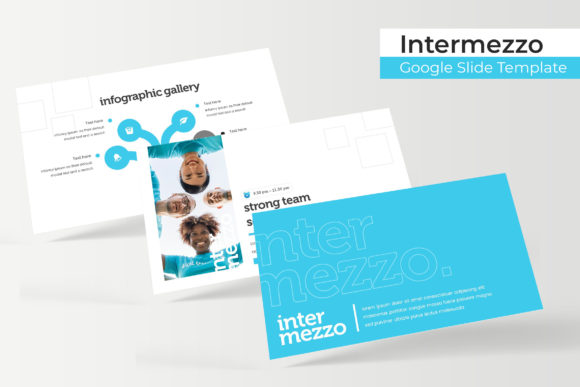
A crucial aspect of utilizing any digital asset responsibly is understanding what is and is not included. Transparency regarding usage rights and content prevents frustration during the implementation phase. It is imperative to note that all photographs or pictures used in the Intermezzo preview materials are intended solely for illustration purposes and are not included in the download. This is standard industry practice, as stock photography licensing varies significantly by region and usage type.
Users should approach this template as a structural vessel rather than a finished product. The placeholders are designed to accommodate your own imagery, ensuring that the final presentation reflects your unique brand or subject matter authentically. Relying on preview images can lead to copyright issues and a lack of originality. Instead, view the exclusion of photos as an opportunity to curate visuals that specifically support your narrative. The template provides the stage; the user must provide the performance. This distinction ensures that the final output remains legally compliant and creatively distinct.
Optimizing the Editing Workflow
To maximize the return on investment when using Intermezzo, users should adopt a workflow that prioritizes master slide editing over individual slide manipulation. Before adding content, it is advisable to review the Master Slide view to understand the grid system and placeholder logic. Customizing global elements such as footer information, page numbering, and logo placement at this stage saves hours of repetitive work later.
Additionally, the resizable and editable graphic features should be utilized thoughtfully. While the template allows for significant modification, maintaining the original aspect ratios and alignment guides preserves the designer’s intent. When resizing infographics or charts, holding the shift key (in most presentation software) ensures proportional scaling, preventing distortion. The handcrafted nature of these graphics means they were designed with specific negative space and balance; respecting these parameters yields superior results compared to aggressive stretching or cropping.
Finally, organization within the file itself contributes to long-term usability. With 150 slides available, it is easy to accumulate unused layouts. Deleting unnecessary slides and renaming remaining ones according to content function creates a cleaner working environment. This digital housekeeping reduces scrolling time and minimizes the risk of accidentally duplicating the wrong layout. By treating the Intermezzo Google Slide Template as a dynamic workspace rather than a static archive, professionals can transform their presentation creation process from a chore into a streamlined, efficient component of their broader communication strategy.