Kinara Google Slide Template: A Practical Guide to Avoiding Common Presentation Pitfalls
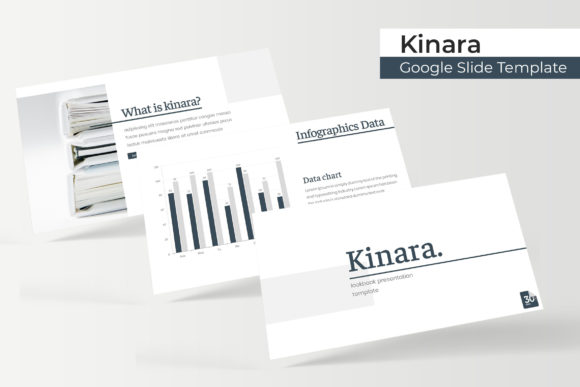
Creating a professional presentation often feels like a race against the clock, where design quality frequently suffers in favor of speed. The Kinara Google Slide Template addresses this specific friction point by offering a structured, comprehensive design system rather than just a collection of pretty backgrounds. With 150 total slides distributed across five distinct premade color themes, this template is designed for users who need volume and variety without sacrificing visual coherence. However, having access to such a robust asset does not automatically guarantee a successful presentation. Many professionals, educators, and entrepreneurs download high-quality templates like Kinara only to misuse them, resulting in decks that look generic or function poorly during live delivery.
Understanding how to leverage the specific architecture of Kinara is essential for maximizing your return on time. This guide focuses on correcting common misunderstandings and practical errors that occur when transitioning from a blank canvas to a pre-designed master slide environment. By avoiding these pitfalls, you ensure that the template serves your content strategy rather than dictating it.
Misunderstanding the Master Slide Architecture
One of the most frequent mistakes users make with the Kinara Google Slide Template is treating every slide as an isolated canvas. When you drag and drop elements or resize graphics directly on individual slides, you bypass the underlying Master Slide structure. While this might seem faster in the moment, it creates significant technical debt. If you later decide to change a font style, update a logo position, or adjust the global color palette, those manual overrides will not update automatically. You will be left editing 30 slides individually instead of applying one global change.
The corrective approach is to respect the hierarchy built into the template. Kinara is based on Master Slides specifically to maintain pixel-perfect consistency. Before adding content, take ten minutes to explore the "Slide Master" view. Understand which placeholders are locked and which are editable. When you need to modify a recurring element, always edit the master layout first. This ensures that your gallery slides, portfolio sections, and infographic pages remain aligned throughout the entire 150-slide library. Efficiency in presentation design comes from working at the system level, not the object level.
Overlooking Color Variation Strategy
Kinara includes five premade color variations, providing 30 slides for each template theme. A common error is selecting a single color scheme at the start and ignoring the other four, or worse, mixing colors from different variations without understanding the design logic. Each color variation in Kinara was handcrafted to serve a specific tonal purpose. Using them interchangeably can result in a disjointed visual narrative that confuses the audience and dilutes brand identity.
Instead of viewing the five PPTX files as redundant copies, treat them as strategic options. Evaluate each variation against your specific communication goal before beginning your draft. For example, one palette may be optimized for high-contrast data visualization, while another might be better suited for soft, narrative-driven portfolio showcases. Once you select a variation, stick to it strictly. If you must introduce an accent color outside the predefined scheme, do so sparingly and intentionally. The value of a premium template lies in its curated harmony; breaking that harmony requires a deliberate design choice, not accidental experimentation.
Navigating Image Placeholders Correctly
The template features resizable and editable graphic picture placeholders designed for drag-and-drop functionality. Beginners often mistake these for standard image frames, leading to distorted aspect ratios or cropped visuals that ruin the pixel-perfect illustrations. Another critical oversight involves licensing. It is vital to remember that all photographs used in the preview are for illustration purposes only and are not included in the download. Assuming these stock images are part of the package leads to last-minute scrambling and potential copyright issues.
To avoid this, prepare your image assets before opening the template. Use tools to crop your photos to the approximate aspect ratio of the Kinara placeholders before importing them. When using the drag-and-drop feature, hold the shift key if necessary to maintain proportions, or use the built-in cropping tool within Google Slides to adjust the fit without distortion. Always source your own high-resolution imagery or licensed stock photography. Relying on placeholder aesthetics without securing actual rights to similar visuals undermines the professionalism the template is meant to convey.
Underutilizing Specialized Slide Types
With 150 slides available, it is tempting to rely solely on standard bullet-point layouts and ignore specialized features like handcrafted infographics, section breaks, and portfolio galleries. This underutilization wastes the primary advantage of choosing a comprehensive template over a basic free theme. Section break slides, for instance, are not merely decorative dividers; they are cognitive cues that help audiences process information shifts. Ignoring them results in a monotonous flow that fatigues viewers.
Audit your content outline against the full Kinara inventory before designing. Identify opportunities where a handcrafted infographic could replace a dense paragraph of text. Use portfolio slides to showcase case studies visually rather than describing them verbally. These specialized slides are engineered to handle complex information density more effectively than standard text boxes. By mapping your content to these specific layouts, you transform the presentation from a simple document read-aloud into a dynamic visual experience.
Font Management and Technical Setup
Typos and formatting breaks often stem from neglecting the setup instructions. Kinara includes a Readme First file and links to free font downloads. Skipping this step is a critical error. If your system lacks the specified fonts, Google Slides will substitute them with default options, destroying the spacing, alignment, and overall aesthetic integrity of the pixel-perfect illustrations. What looks perfect on the designer’s screen can appear broken on yours simply because of missing typography assets.
Make font installation the very first step in your workflow. Download and install the recommended free fonts before opening any of the five PPTX widescreen files. After installation, restart your browser or application to ensure the new typefaces are recognized. Additionally, verify that you are working in the widescreen (16:9) version unless you have a specific requirement for standard sizing. Working in the wrong aspect ratio causes stretching and reformatting headaches that are entirely preventable with a moment of initial setup.
Evaluating Fit Before Commitment
Before integrating Kinara into your next project, conduct a realistic assessment of your needs versus the template's capabilities. While 150 slides offer immense flexibility, they also require curation. Ask yourself if you have enough content to justify exploring multiple sections, or if a simpler deck would suffice. Consider whether your brand guidelines align with the five available color palettes, or if extensive customization would negate the time-saving benefits.
Check the compatibility of your current workflow with Google Slides' native features. Ensure your team has access to edit master slides if collaboration is required. Review the license terms regarding commercial use if you are a freelancer or agency creating deliverables for clients. Making these evaluations upfront prevents frustration mid-project. The Kinara Google Slide Template is a powerful tool for creators, marketers, and educators, but its effectiveness depends entirely on informed usage. By approaching the template with technical awareness and strategic intent, you move beyond simple decoration and achieve genuine communication efficiency.