Maximizing Presentation Impact with the Quadrat Google Slide Template System
In the modern digital landscape, the ability to communicate complex ideas visually is as critical as the content itself. For professionals, educators, and creators, the friction between having a great concept and executing a polished visual presentation often leads to wasted hours or subpar results. The Quadrat Google Slide Template addresses this gap by providing a comprehensive, modular design system rather than a simple collection of slides. With 150 total slides distributed across five distinct premade color themes, this resource functions as a scalable toolkit for diverse communication needs. Understanding how to leverage such a robust asset requires looking beyond surface-level aesthetics and examining the structural advantages it offers for workflow efficiency, brand consistency, and audience engagement.
Strategic Color Coding and Thematic Organization
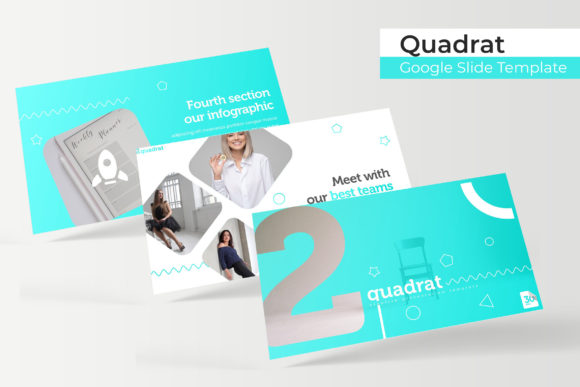
One of the most significant challenges in presentation design is maintaining visual consistency while avoiding monotony. The Quadrat system solves this through its specific architecture: 30 slides dedicated to each of the five color variations. This organization is not merely cosmetic; it serves a strategic function for users managing multiple projects or distinct content pillars.
For business owners and marketers, these five color palettes can represent different product lines, quarterly reports, or client brands without requiring a complete redesign from scratch. An educator might assign specific colors to different units of study, helping students cognitively categorize information through visual association. Researchers presenting multifaceted data can use color coding to distinguish between methodology, results, and discussion sections. Because each theme contains a full suite of 30 unique layouts, users are never forced to mix incompatible styles. This depth ensures that whether you need a title slide, a data-heavy chart, or a closing summary, the specific layout exists within your chosen color ecosystem.
The Psychology of Premade Palettes
Color selection is often where non-designers struggle most. By utilizing professionally curated premade colors, users bypass the risk of clashing hues or accessibility issues. These palettes are designed to ensure sufficient contrast for readability on both projectors and screens. When using the Quadrat template, the user inherits professional color theory applications that enhance information retention. The psychological impact of color—blue for trust, orange for creativity, green for growth—is baked into the template structure, allowing the presenter to focus on narrative rather than hex codes.
Visualizing Data Through Handcrafted Infographics
Information density is the enemy of engagement. Dense text slides cause audiences to disengage, whereas well-structured visuals facilitate understanding. A standout feature of the Quadrat ecosystem is the inclusion of handcrafted infographic slides. Unlike generic clip art or automated chart generators, these graphics are pixel-perfect illustrations created with intention.
Handcrafted infographics differ fundamentally from standard shapes. They possess a level of detail and stylistic cohesion that signals professionalism. For researchers and analysts, these slides provide pre-built frameworks for displaying statistics, timelines, processes, and hierarchies. Instead of spending hours aligning boxes and arrows, users can select an infographic that matches their data structure and simply update the text. This capability is particularly valuable for explaining abstract concepts or complex workflows where standard bullet points fail to capture nuance. The pixel-perfect nature of these assets ensures they remain crisp at any zoom level, preserving the integrity of the presentation during Q&A sessions or when exported to PDF.
Master Slide Architecture and Editability
The true power of any premium template lies in its master slide architecture. Quadrat is built on a foundation of resizable and editable graphic elements. This means that changes made at the master level propagate throughout the deck, ensuring global consistency. More importantly, individual elements on content slides remain fully accessible. Users are not locked into static images; every icon, shape, and placeholder can be modified, recolored, or repositioned.
This editability is crucial for customization. A picture placeholder in Quadrat is designed for drag-and-drop functionality, streamlining the process of adding team photos, product shots, or case study imagery. However, because these placeholders are tied to the master slide logic, replacing an image does not break the layout or distort the aspect ratio. This technical reliability saves significant time during revisions, allowing presenters to swap content rapidly without needing advanced design skills.
Narrative Flow and Structural Components
A successful presentation is a story, not just a data dump. The Quadrat template includes specialized components designed to manage narrative pacing. Section break slides and gallery/portfolio layouts serve as the connective tissue of the presentation, guiding the audience through transitions and providing visual breathing room.
- Section Break Slides: These act as cognitive reset buttons. In long presentations, such as training workshops or annual reviews, section breaks help reorient the audience. They signal a shift in topic and allow the presenter to pause for questions or emphasis. Using a consistent section break style from the Quadrat library reinforces the structural hierarchy of the talk.
- Gallery and Portfolio Slides: Essential for creatives, agencies, and product teams, these layouts prioritize imagery over text. They are optimized to showcase work samples, before-and-after comparisons, or team members. The grid systems used in these slides are mathematically balanced, ensuring that even if images have slightly different dimensions, the overall composition remains harmonious.
These structural elements prevent the "wall of text" syndrome. By alternating between content-heavy slides and visual breaks, presenters maintain audience attention spans more effectively. The availability of these specific slide types within the 150-slide library means users do not have to engineer transition slides manually, which is often where amateur designs fall apart.
Technical Specifications and Asset Management
When integrating a new template into a professional workflow, technical compatibility and asset clarity are paramount. The Quadrat package is delivered with precise specifications that cater to various display environments and software preferences.
File Formats and Compatibility
The inclusion of 5 PPTX files alongside Google Slides versions ensures maximum flexibility. While Google Slides offers cloud-based collaboration, many corporate environments still rely on PowerPoint for offline editing or strict brand compliance. Providing native PPTX widescreen files guarantees that animations, fonts, and vector graphics render correctly outside the browser. This dual-format approach future-proofs the asset, making it usable regardless of platform shifts or internet connectivity issues.
Typography and Licensing Transparency
Fonts are frequently overlooked until they cause formatting errors. Quadrat mitigates this risk by including free font download links in the Readme file. This transparency ensures that all users, regardless of their operating system or existing font library, can replicate the intended aesthetic. Relying on free, open-source fonts also eliminates licensing headaches for commercial users. Furthermore, the Readme serves as a critical guide for setup, reducing the learning curve associated with adopting a new design system.
Understanding Usage Rights and Limitations
Professional integrity requires clear boundaries regarding asset usage. It is vital to note that all photographs or pictures used in the preview are for illustration purposes only and are not included in the download. This distinction protects users from accidental copyright infringement. Presenters must source their own imagery, but the high-quality placeholders in Quadrat make it easy to visualize where personal assets should go. This separation encourages originality and ensures that the final presentation reflects the user’s unique brand identity rather than stock photography.
Practical Applications Across Diverse Sectors
The versatility of a 150-slide system becomes apparent when applied to specific real-world scenarios. The sheer volume of options allows the Quadrat template to adapt to vastly different contexts without feeling repetitive.
Corporate Training and Onboarding: HR departments can utilize the section breaks to divide training modules and the infographics to explain company policies or safety procedures. The consistent color coding helps new hires associate specific visual cues with different departments or protocols, aiding memory retention.
Academic Research and Conferences: Researchers benefit from the clean, minimalist layouts that prioritize data legibility. The handcrafted charts allow for the visualization of complex datasets without the clutter often found in default software templates. The widescreen format ensures visibility in large lecture halls.
Creative Portfolios and Pitch Decks: Freelancers and agencies can leverage the gallery slides to showcase past work professionally. The ability to quickly switch between color themes allows a designer to tailor a pitch deck to a prospective client’s branding instantly, demonstrating attentiveness and adaptability.
Non-Profit and Community Outreach: Organizations with limited design budgets can achieve a high-end look that builds donor trust. The emotional resonance of the color palettes combined with impactful image placeholders helps tell compelling stories that drive action.
Optimizing Workflow Efficiency
Ultimately, the value proposition of the Quadrat Google Slide Template extends beyond aesthetics to operational efficiency. Creating a presentation from scratch typically involves dozens of micro-decisions regarding alignment, spacing, color balance, and typography. Each decision consumes mental energy and time. By outsourcing these foundational design decisions to a pre-engineered system, professionals reclaim hours of productive time.
The drag-and-drop functionality and master slide integration reduce the technical barrier to entry. Users do not need to be proficient in graphic design software to produce pixel-perfect results. This democratization of design quality allows subject matter experts to focus entirely on their message. Whether preparing a last-minute update for stakeholders or planning a semester-long curriculum, the reliability of the Quadrat system provides a stable foundation upon which effective communication is built. The combination of volume, variety, and technical precision makes it a sustainable solution for anyone who communicates visually on a regular basis.