Azizou Google Slide Template: A Practical Asset for Professional Presentations
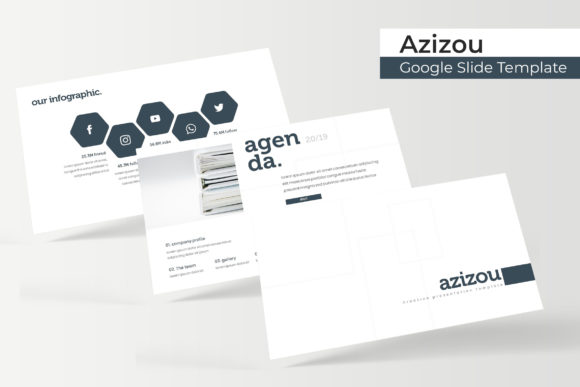
In the landscape of digital communication, the efficiency of your workflow often dictates the quality of your final output. For professionals who rely on Google Slides or PowerPoint to convey complex information, finding a template that balances aesthetic appeal with structural utility is a genuine challenge. The Azizou Google Slide Template distinguishes itself not merely as a collection of attractive layouts, but as a comprehensive presentation system designed for heavy usage. With a substantial library of 150 total slides distributed across five distinct color themes, this asset targets users who require volume and variety without sacrificing visual consistency. It serves as a robust foundation for entrepreneurs, educators, marketers, and business owners who need to produce high-stakes presentations without engaging a graphic designer for every new project.
Evaluating Volume and Structural Variety
The primary value proposition of Azizou lies in its sheer scale. Many templates offer twenty or thirty unique slides, which quickly leads to repetition in longer decks or across multiple projects. Azizou provides 150 total slides, organized into five separate premade color variations. This structure effectively gives users five complete 30-slide templates in one package. From a practical standpoint, this segmentation is crucial. It allows a marketing agency to use the blue theme for corporate clients and the vibrant orange theme for creative pitches, maintaining brand separation while utilizing the same underlying master slide architecture.
This volume supports diverse narrative structures. Whether you are building a quarterly financial report, a startup pitch deck, or an educational workshop module, the likelihood of finding a specific layout that matches your content flow is significantly higher than with smaller libraries. The inclusion of dedicated section break slides ensures that transitions between topics feel intentional rather than abrupt. These breaks serve as visual palate cleansers, helping audiences reset their attention spans during dense informational sessions. For presenters who frequently update recurring reports, having thirty unique options per color theme reduces the fatigue of seeing the same title and content slides repeatedly.
Handcrafted Infographics and Data Visualization
Data visualization is often the breaking point for generic templates. Stock templates frequently rely on basic charts that require significant reformatting to look professional. Azizou addresses this through handcrafted infographics that prioritize clarity and editability. These are not static images; they are fully editable vector elements built directly within the slide environment. This distinction matters for long-term usability. When data changes next quarter, you do not need to recreate the graphic from scratch or return to external design software. You simply adjust the values and resize the shapes within the presentation tool itself.
The pixel-perfect illustrations included in the set maintain crispness regardless of scaling. This technical precision prevents the blurry, amateurish appearance that often plagues resized graphics in standard office suites. For freelancers and consultants whose reputation hinges on polished deliverables, this level of detail provides a safety net. The infographics cover common business needs—timelines, process flows, comparative stats, and hierarchical diagrams—making them immediately applicable to real-world scenarios rather than serving as abstract decoration.
Workflow Efficiency Through Master Slides
A template is only as good as its master slide configuration. Azizou demonstrates a strong understanding of how power users interact with presentation software. The gallery and portfolio slides utilize resizable and editable picture placeholders that function via drag-and-drop mechanics. This seemingly minor feature drastically reduces production time. Instead of manually cropping images and aligning them with text boxes, users can drop media directly into predefined frames that automatically handle masking and positioning. This ensures that even if team members have varying levels of design skill, the final output remains aligned with the template’s grid system.
The reliance on master slides extends beyond image placement. Typography, color palettes, and logo positioning are controlled globally. Changing a font across 150 slides should be a single action, not a tedious manual process. Azizou facilitates this centralized control, allowing for rapid customization. If a client requests a shift from serif to sans-serif headers halfway through a project, the change propagates instantly. This reliability makes the template a sustainable asset for agencies or departments managing multiple brands, as it enforces consistency while permitting necessary flexibility.
Cross-Platform Compatibility and File Management
Modern workflows rarely exist within a single ecosystem. While branded as a Google Slide Template, Azizou acknowledges the reality of hybrid environments by including five PPTX files alongside the Google Slides versions. Furthermore, both widescreen and standard aspect ratios are provided. This dual-format approach eliminates the formatting disasters that occur when converting between platforms. A user might build a deck in Google Slides for collaboration but need to deliver a native PowerPoint file to a corporate client with strict security protocols. Having native files for both platforms ensures that animations, fonts, and layouts remain intact during transfer.
The package organization reflects professional standards. Separate files for each color variation prevent the bloat that comes with loading hundreds of unused slides into a single document. The inclusion of a Readme file with free font download links removes the friction of missing typefaces, a common annoyance that delays project kickoffs. By addressing these logistical details upfront, the creators demonstrate an understanding of the user's operational context, not just their aesthetic preferences.
Real-World Application and Audience Fit
Determining whether Azizou fits your specific needs requires looking past the feature list to actual application. For entrepreneurs and startup founders, the template offers enough variety to create distinct decks for investors, partners, and customers without purchasing three separate products. The portfolio and gallery layouts are particularly useful for showcasing product evolution or team credentials. For educators and trainers, the section breaks and infographic slides support pedagogical pacing, breaking complex lessons into digestible visual segments. The clean typography ensures readability in both lecture halls and remote learning environments.
Marketers and content creators will find the most immediate ROI in the social-media-friendly aspect ratios and the handcrafted infographics, which can be exported as standalone assets for blog posts or newsletters. However, it is important to manage expectations regarding photography. As noted in the product specifications, all photographs used in previews are for illustration purposes only and are not included. Users must supply their own imagery. While the placeholders make integration easy, those expecting a "ready-to-publish" solution with stock photos included will need to budget additional time or resources for sourcing visuals. This limitation is standard for premium templates but warrants emphasis for buyers seeking turnkey solutions.
Long-Term Value and Customization Potential
The true test of any digital asset is its longevity. Trends fade, and templates that rely too heavily on stylistic flourishes often become dated within months. Azizou adopts a relatively neutral, modern aesthetic that prioritizes structure over trendiness. This restraint enhances its shelf life. Because the designs are based on fundamental grid principles rather than decorative excess, they adapt well to rebranding efforts. A user could purchase this template today and reasonably expect it to remain viable for several years of business communications.
Furthermore, the editability of every element means the template grows with the user. As design skills improve, users can deconstruct the master slides to understand professional layout techniques, effectively using the template as a learning tool. For small business owners operating without a dedicated design team, this educational side effect adds intangible value beyond the immediate utility of the slides themselves.
Practical Considerations Before Purchase
While Azizou offers significant advantages, prospective users should consider their technical comfort level. Fully leveraging 150 slides and master slide functionality requires more than basic familiarity with presentation software. Users accustomed to simple drag-and-drop builders may initially find the depth of options overwhelming. There is a learning curve associated with navigating such a large library and understanding how global changes affect individual slides. Investing time in reading the included documentation and experimenting with the master views is necessary to unlock the template's full potential.
Additionally, while the five color variations provide breadth, they may not perfectly match every brand guideline out of the box. Users should anticipate spending initial setup time customizing the color palette to their specific hex codes. Fortunately, the master slide architecture makes this feasible, but it is still a required step. The template is a starting point, not a finished product. Those willing to invest thirty minutes in initial configuration will reap hours of savings downstream; those seeking zero-touch automation may find the customization requirements misaligned with their expectations.
Ultimately, Azizou represents a mature approach to presentation design resources. It trades superficial novelty for functional depth, offering a toolkit rather than mere decoration. For professionals who view presentations as a core business function rather than an occasional afterthought, the combination of volume, cross-platform compatibility, and structural integrity makes it a worthy addition to the digital asset library. Its strengths lie in its capacity to streamline production while maintaining professional standards, making it particularly valuable for users who produce content at scale and demand reliability from their tools.