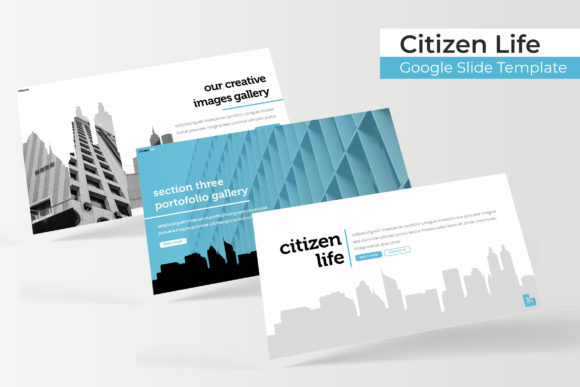
Citizen Life Google Slide Template: A Practical Asset for Modern Presentations
Creating a compelling presentation often feels like a battle between content and design. You have the data, the story, or the pitch ready, but staring at a blank slide deck can stall your momentum. The Citizen Life Google Slide Template addresses this specific friction point by providing a comprehensive visual framework that allows you to focus on messaging rather than formatting. With 150 total slides distributed across five distinct premade color themes, this resource is designed for users who need professional aesthetics without hiring a dedicated designer for every project.
At its core, this template system is built on master slides, ensuring that global changes apply consistently across your entire deck. Whether you are adjusting typography or swapping logo placements, the underlying structure maintains alignment and spacing. This technical foundation matters because it prevents the "broken slide" syndrome where manual edits accidentally ruin layout integrity. For busy professionals and creators, this reliability transforms presentation building from a chore into a streamlined workflow.
Real-World Applications for Entrepreneurs and Small Business Owners
For entrepreneurs pitching to investors or small business owners presenting quarterly updates, time is a scarce resource. The Citizen Life Google Slide Template offers immediate utility through its gallery and portfolio slides. Imagine you are a freelance photographer or a boutique marketing agency owner. You need to showcase past work to secure a new client. Instead of building image grids from scratch, you can utilize the pre-configured portfolio layouts. These sections include resizable and editable graphic picture placeholders that support drag-and-drop functionality, allowing you to swap in your actual work in seconds while maintaining pixel-perfect proportions.
The inclusion of handcrafted infographics in PowerPoint format is particularly valuable for business reporting. When explaining market growth, user demographics, or revenue streams, raw numbers often fail to land. The template’s infographic slides translate complex datasets into digestible visuals. Because these are vector-based and fully editable, you aren't stuck with generic stock charts. You can adjust the colors to match your brand identity and update the figures to reflect your specific reality, making your business case more persuasive and visually coherent.
Educational and Non-Profit Use Cases
Educators and non-profit organizers face a different set of challenges. They often need to present dense information to diverse audiences without causing cognitive overload. The section break slides included in this template serve as essential pacing tools. In a classroom setting or a community workshop, these dividers signal transitions between topics, helping learners mentally organize new information. The clean, structured design reduces visual noise, which is crucial when teaching complex subjects or advocating for social causes.
Furthermore, the five color variations allow educators to color-code different modules or semesters. A teacher might use one palette for history lessons and another for literature, creating a subtle visual association for students. For non-profits, switching between color themes enables the creation of multiple campaign decks from a single master file. You could produce a donor-facing financial report in a conservative blue theme and a volunteer recruitment deck in a vibrant orange variation, all while retaining consistent branding elements and layout logic.
Streamlining Content Creation for Digital Marketers
Digital marketers and bloggers frequently repurpose long-form content into slide decks for LinkedIn carousels, webinars, or lead magnets. The sheer volume of slides in the Citizen Life Google Slide Template supports this high-output workflow. Having 30 slides per color variation means you likely won't run out of unique layouts even if you produce weekly presentations. This variety prevents audience fatigue; your followers won't feel like they are seeing the same recycled template every time you post.
The widescreen format optimization is critical here. As most digital consumption happens on laptops and monitors, ensuring your content fills the screen without black bars enhances perceived production value. Marketers can also leverage the free font download links included in the readme file. Typography plays a massive role in conversion rates and readability. By using the recommended typefaces, you ensure that your slides look identical to the preview, avoiding the common issue where missing fonts cause text reflow and layout destruction on different devices.
Considerations Before Implementation
While this template offers significant advantages, potential users should approach it with realistic expectations to maximize value. First, understand that the photographs used in previews are for illustration purposes only and are not included. This is standard practice, but it means you must have your own assets ready. If you lack high-quality imagery, the template's picture placeholders will highlight that gap. Plan your visual asset gathering before opening the file to maintain momentum.
Additionally, consider the learning curve associated with master slides. While the template is drag-and-drop friendly, understanding how to edit the master view unlocks its true power. Users who only edit individual slides may find themselves fighting against the template's logic. Taking ten minutes to explore the master slide structure will save hours of frustration later. Also, verify that your software version supports all features. While PPTX files are widely compatible, certain advanced animations or font renderings can vary between Google Slides and desktop PowerPoint versions.
Technical Flexibility and Customization Outcomes
The decision to provide five separate PPTX files rather than one massive file is a practical design choice. It keeps file sizes manageable and reduces load times, which is especially important for users working on older hardware or slow internet connections. You can open only the color variation you currently need, keeping your workspace uncluttered. This modular approach also simplifies collaboration. Team members can work on different color-coded sections simultaneously without navigating a monolithic document.
Pixel-perfect illustrations distinguish this template from lower-quality alternatives. In professional settings, blurry or distorted graphics undermine credibility. The vectors included here scale infinitely without quality loss, meaning your presentation looks crisp whether projected on a conference room wall or viewed on a mobile phone. This scalability future-proofs your content. As display resolutions improve, your assets remain sharp, protecting your investment in the template over the long term.
Maximizing Value Across Different Skill Levels
For beginners, the Citizen Life Google Slide Template acts as a guardrail. The predefined layouts teach basic design principles like hierarchy, whitespace, and alignment simply by usage. You learn what makes a slide effective by interacting with professionally constructed examples. For advanced users, it serves as a rapid prototyping tool. Designers can use the base structure to test concepts quickly before committing to custom builds, or as a fallback option when deadlines are tight.
Ultimately, the value of this template lies in its adaptability. It bridges the gap between rigid, unusable designs and chaotic, unstructured freedom. By providing a robust yet flexible skeleton, it empowers users across the spectrum—from hobbyists sharing passion projects to executives closing deals—to communicate their ideas with clarity and confidence. The combination of extensive slide variety, editable components, and professional polish makes it a functional tool for anyone who understands that good design is not just about aesthetics, but about effective communication.