Puzzie Keynote Template: A Practical Resource for Modern Presentations
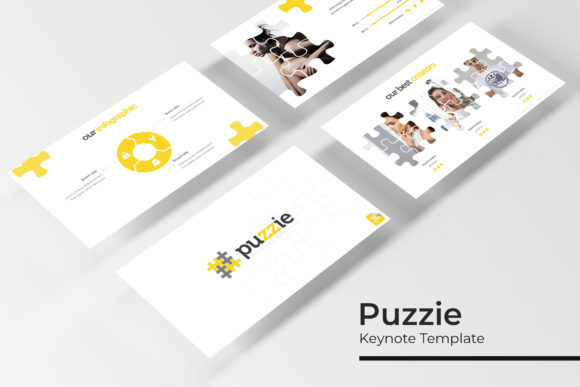
Creating a compelling presentation often feels like solving a puzzle. You have the data, the narrative arc, and the visual assets, but fitting them together into a cohesive story requires significant design effort. The Puzzie Keynote Template addresses this friction by providing a structured yet flexible framework specifically designed for Apple Keynote users who need professional results without starting from scratch. With 150 total slides distributed across five distinct premade color themes, this resource is less about rigid formatting and more about offering a comprehensive library of visual solutions for diverse communication needs.
At its core, Puzzie is built on the concept of modularity. Each of the five color variations contains 30 unique slides, allowing presenters to mix and match layouts while maintaining visual consistency. This structure is particularly valuable for professionals who manage multiple brands or need to adapt a single core message for different audiences. Rather than purchasing separate templates for each project, users gain access to a versatile system that can be customized through master slides and editable graphics. The inclusion of handcrafted infographics and pixel-perfect illustrations ensures that complex information remains digestible, transforming raw data into engaging visual narratives.
Real-World Applications Across Industries
The true value of the Puzzie Keynote Template emerges when applied to specific professional scenarios. While generic templates often fail to address niche requirements, Puzzie’s diverse slide library supports a wide range of use cases. For marketing teams preparing quarterly reviews, the handcrafted infographic slides provide an immediate solution for visualizing KPIs, conversion funnels, and growth metrics. Instead of spending hours aligning shapes and charts in Keynote, marketers can drag and drop their data into pre-formatted placeholders that are already optimized for readability and impact.
In the creative sector, agencies and freelancers frequently struggle to showcase portfolio work within presentation software. Standard layouts often crop images awkwardly or lack the whitespace necessary for artistic breathing room. Puzzie includes dedicated gallery and portfolio slides designed with high-resolution imagery in mind. These layouts respect the aspect ratios of photographs and allow for easy resizing via picture placeholders. A photographer pitching to a commercial client or a designer presenting brand guidelines can utilize these sections to create an immersive visual experience that rivals dedicated portfolio websites, all within a familiar Keynote environment.
Educators and corporate trainers also benefit significantly from the template’s section break slides. Long training sessions or academic lectures require clear visual cues to signal transitions between topics. Puzzie provides stylized dividers that maintain engagement during these pivotal moments, preventing the "wall of text" fatigue that often plagues educational presentations. Furthermore, the resizable graphic elements allow instructors to customize diagrams for different class sizes or screen resolutions without losing fidelity, ensuring that students in the back row receive the same quality of instruction as those in the front.
Navigating Customization and Workflow Efficiency
Efficiency is the primary driver for adopting premium presentation assets, and Puzzie facilitates this through its master slide architecture. Users should understand that editing individual slides is rarely necessary for global changes. By accessing the master slides, you can update logos, fonts, or background colors across all 30 slides in a specific color variation simultaneously. This feature is indispensable for agencies managing multiple client accounts, as it reduces the risk of branding errors and drastically cuts down revision time. When a client requests a color tweak at the eleventh hour, the change propagates instantly throughout the deck.
The template’s drag-and-drop functionality extends beyond simple image placement. The editable graphics and vector-based illustrations are constructed natively within Keynote, meaning they do not require external software like Adobe Illustrator to modify. This accessibility empowers non-designers to adjust visual elements to fit their specific content. If a timeline graphic has six steps but your project only has four, you can simply delete the excess nodes and resize the remaining elements. This level of editability distinguishes Puzzie from static image-based templates where customization is limited to text replacement.
For teams collaborating across different devices, the inclusion of both standard and widescreen PPTX files alongside the native Keynote files adds a layer of practical versatility. While the template is optimized for Keynote, having PowerPoint-compatible versions ensures that stakeholders outside the Apple ecosystem can still review and edit the content. This cross-platform consideration prevents workflow bottlenecks in mixed-environment offices, making Puzzie a safer investment for organizations that cannot guarantee universal software compatibility.
Strategic Considerations Before Implementation
Before integrating Puzzie into your workflow, it is important to assess whether its aesthetic aligns with your communication goals. The template features five distinct color palettes, each evoking a different tone. Selecting the right variation is crucial; a vibrant, high-contrast theme may energize a sales pitch but could overwhelm a sensitive HR policy update. Users should preview all five options against their specific content type before committing to a direction. The ability to switch between these premade colors allows for rapid prototyping, enabling presenters to test which emotional resonance best supports their narrative.
Another critical consideration involves asset management. As noted in the product documentation, all photographs used in preview materials are for illustration purposes only and are not included. This is standard industry practice, but it requires users to have their own library of high-quality imagery ready. Relying on low-resolution stock photos or inconsistent personal snapshots can undermine the premium feel of the pixel-perfect illustrations. Budgeting time for sourcing appropriate visuals is just as important as customizing the slides themselves. The picture placeholders are designed to highlight quality imagery, so the final output will only be as strong as the assets you insert.
Typography also plays a significant role in the template’s effectiveness. Puzzie utilizes free fonts with download links provided in the Readme file. Installing these fonts before opening the template is essential to prevent substitution errors that can alter spacing and layout integrity. While Keynote handles missing fonts gracefully, the resulting reflow can disrupt the carefully crafted alignment of infographics and text blocks. Taking five minutes to set up the typographic environment upfront saves considerable frustration during the editing process.
Balancing Structure with Creative Freedom
While Puzzie offers extensive resources, users should approach it as a foundation rather than a finished product. The 150-slide count provides ample variety, but not every slide will be relevant to every presentation. Curating a subset of 15–20 slides that form a coherent narrative is often more effective than forcing unnecessary variety. The strength of the template lies in its ability to accelerate the creation of this curated selection, not in dictating the length or scope of your presentation.
The handcrafted nature of the infographics deserves special attention. Unlike auto-generated charts that pull directly from spreadsheet data, these graphics are illustrative representations meant to convey concepts visually. They excel at explaining processes, hierarchies, and relationships that traditional bar graphs cannot capture. However, they require manual updating. Users accustomed to linking Excel tables to Keynote charts should recognize that Puzzie’s infographics prioritize design over dynamic data linkage. This trade-off is usually worthwhile for conceptual presentations but may require additional effort for data-heavy financial reports where precision supersedes aesthetics.
Ultimately, the Puzzie Keynote Template serves as a bridge between professional design standards and everyday presentation needs. It acknowledges that most presenters are not full-time designers but still require polished, effective communication tools. By combining modular flexibility with high-quality visual assets, it enables users to focus on refining their message rather than wrestling with alignment guides. Whether you are pitching investors, training employees, or showcasing creative work, the template provides the structural support necessary to deliver ideas with clarity and confidence. The key to maximizing its potential lies in understanding its components, respecting its design intent, and adapting its resources to serve your unique storytelling objectives.