Nikitu Power Point Template: Design & Features
Creating a presentation that feels both professional and authentically creative is often a balancing act. The Nikitu Power Point Template addresses this challenge by offering a comprehensive suite of slides designed for modern storytellers, marketers, and entrepreneurs. Unlike generic corporate decks that rely on sterile grids and overused stock imagery, Nikitu brings a distinct visual personality to your content. It bridges the gap between high-end editorial design and functional business communication, making it an ideal asset for brand strategists, publishers, and content creators who need their slide decks to reflect a cohesive brand identity.
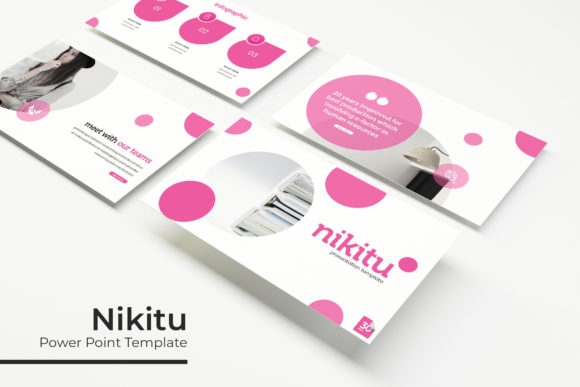
The template’s appeal lies in its versatility and attention to detail. With 150 total slides organized across five distinct color variations, it provides enough depth to handle complex narratives without feeling repetitive. Each of the five premade color themes contains 30 unique slides, allowing you to maintain visual consistency throughout a long pitch deck or workshop while subtly shifting tones to match different sections of your story. This structure supports strong visual hierarchy, ensuring that your audience remains engaged through varied layouts rather than a monotonous stream of bullet points.
Crafting Visual Narratives with Handcrafted Assets
One of the standout characteristics of Nikitu is its library of handcrafted infographic elements. In an era where AI-generated graphics and standard icon packs can make presentations feel impersonal, these pixel-perfect illustrations add a layer of bespoke quality. For designers and marketers, this means your data visualization doesn't have to look like a default Excel chart exported into PowerPoint. Instead, you can utilize custom graphics that align with modern typography trends and creative font aesthetics, turning dry statistics into compelling visual stories.
The inclusion of gallery and portfolio slides further enhances its utility for creative professionals. Whether you are a photographer showcasing a new collection, an agency presenting case studies, or a small business owner displaying product lines, these layouts are engineered to let images breathe. The picture placeholders are fully resizable and editable, utilizing a drag-and-drop functionality based on master slides. This technical foundation ensures that even if you adjust image dimensions or swap content, the underlying alignment and spacing remain intact. You do not need to be a PowerPoint expert to achieve a polished, professional look; the master slide architecture handles the heavy lifting so you can focus on curation and messaging.
Typography and Brand Consistency Across Formats
While Nikitu is primarily a layout tool, its approach to typography deserves specific attention for anyone concerned with brand perception. The template includes links to free font downloads, ensuring that the typeface used in the preview matches what you see on your screen. This eliminates the common frustration of missing fonts that break formatting and ruin visual hierarchy. By integrating accessible, high-quality typography, the template supports readability and maintains a consistent tone across all 150 slides.
For those working on brand identity projects, the font choices within Nikitu demonstrate effective pairing strategies. The balance between display fonts for headers and clean sans serif options for body text mirrors best practices in editorial and web design. This typographic discipline influences how audiences perceive your professionalism and attention to detail. When your presentation uses harmonious type scales and appropriate whitespace, it signals competence and clarity. This is particularly crucial for entrepreneurs and bloggers who use slide decks as lead magnets or educational products; the design quality directly impacts the perceived value of the information being shared.
Furthermore, the widescreen format support ensures that your typography and layout integrity hold up across different display environments. Whether presenting on a large conference screen, sharing via Zoom, or exporting to PDF for email distribution, the 16:9 aspect ratio preserves the intended composition. This adaptability is essential for multi-channel marketing strategies where the same core content might be repurposed for social media graphics, webinar recordings, or downloadable resources.
Practical Workflow and Asset Management
Beyond aesthetics, the practical organization of Nikitu makes it a reliable workhorse for busy professionals. The package includes five separate PPTX files corresponding to each color variation, plus widescreen versions of each. This modular approach simplifies asset management; instead of navigating a massive single file with hundreds of hidden slides, you can open only the specific theme you need. The included Readme file serves as a quick-start guide, providing necessary context and download links without unnecessary fluff.
It is important to note a standard licensing distinction relevant to commercial users: photographs and pictures used in the preview are for illustration purposes only and are not included in the download. While this requires sourcing your own imagery, it actually benefits brand consistency. Using placeholder images forces you to select photography that genuinely aligns with your specific project rather than settling for generic stock photos that came bundled with the template. This encourages a more intentional design process where every visual element supports your unique narrative.
Evaluating Fit for Your Next Project
When deciding if Nikitu is the right foundation for your upcoming presentation, consider the nature of your content and your audience's expectations. This template excels in scenarios requiring a blend of creativity and structure:
- Creative Portfolios: Ideal for designers, artists, and architects who need grid-based layouts that highlight visual work without competing with it.
- Brand Guidelines: The color variation system allows you to demonstrate brand flexibility and application rules effectively.
- Educational Workshops: Section break slides and infographic elements help chunk complex information into digestible modules for students or trainees.
- Marketing Pitches: Professional yet distinctive layouts help differentiate your proposal from competitors using standard corporate templates.
- Digital Products: Content creators can use the master slides to rapidly produce consistent course materials or e-books.
If your project demands strict corporate compliance or highly technical engineering diagrams, you may need to supplement Nikitu with specialized assets. However, for the vast majority of creative, marketing, and entrepreneurial communications, it provides a robust starting point. The combination of editable vector graphics, thoughtful typography integration, and extensive layout variety reduces production time significantly. Rather than building a deck from scratch or fighting against rigid templates, you gain a flexible design system that adapts to your content.
Ultimately, the value of a premium presentation template like Nikitu isn't just in the number of slides, but in the design intelligence embedded within them. It reflects an understanding of modern visual communication where aesthetics serve function. By leveraging its handcrafted elements, master slide architecture, and typographic coherence, you can produce presentations that not only convey information effectively but also strengthen your overall brand recognition and audience engagement. The result is a deliverable that feels custom-designed, even when created under tight deadlines.