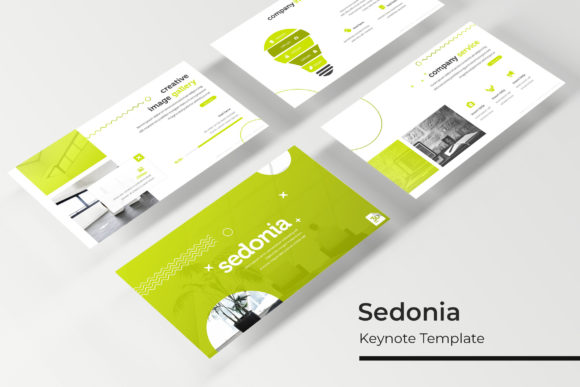
Sedonia Keynote Template: Design Versatile Presentations
Creating a presentation that feels both professionally polished and authentically yours often requires balancing structure with creative freedom. The Sedonia Keynote Template addresses this specific challenge by providing a comprehensive framework that eliminates the blank canvas paralysis without stifling individual expression. With 150 total slides organized across five distinct premade color themes, this resource is designed for professionals who need to communicate complex ideas clearly while maintaining a high standard of visual design. Whether you are pitching a startup concept, teaching a workshop, or showcasing a creative portfolio, Sedonia offers the structural foundation necessary to let your content shine.
A System Built for Visual Consistency
The primary advantage of using a robust template like Sedonia lies in its master slide architecture. Rather than formatting individual slides one by one, which often leads to inconsistent alignment and typography errors, this system utilizes a global master slide approach. This ensures that every element, from header placement to footer styling, remains pixel-perfect throughout the entire deck. For designers and marketers, this consistency builds trust with the audience. It signals attention to detail and professionalism before a single word is spoken.
The template includes 30 unique slides for each of the five color variations. This separation allows users to commit to a specific brand identity or mood without wading through irrelevant options. If your project demands a corporate blue aesthetic, you can work exclusively within that file. Alternatively, if you are testing different visual directions for a client pitch, having five distinct PPTX files enables rapid iteration. You can present multiple concepts side-by-side to stakeholders without rebuilding the core layout structure.
Handcrafted Infographics for Data Storytelling
Data visualization is often where presentations fail. Generic chart tools rarely match the custom look of a well-designed deck. Sedonia distinguishes itself with handcrafted infographic slides that are fully editable within PowerPoint and Keynote. These are not static images; they are vector-based graphic elements that you can manipulate directly. You can adjust percentages, change labels, and recolor segments to match your specific dataset.
This level of editability transforms abstract numbers into compelling narratives. Instead of pasting a screenshot of an Excel chart, you integrate data seamlessly into the presentation’s design language. For educators and researchers, this means explaining complex statistics with clarity. For business owners, it means highlighting growth metrics with visual impact that reinforces the spoken message. The infographics serve as functional design elements that bridge the gap between raw information and audience understanding.
Adapting Sedonia Across Different Contexts
Versatility is the hallmark of a useful creative asset. While some templates are niche-specific, Sedonia’s neutral yet sophisticated layouts make it adaptable across various industries and use cases. Understanding how to leverage these layouts for different goals maximizes the return on your creative investment.
- Entrepreneurs and Startups: Use the section break slides to create clear narrative chapters in your pitch deck. Investors appreciate structure. The gallery slides are perfect for product demonstrations or team introductions, allowing you to build credibility through professional imagery.
- Educators and Trainers: Leverage the text-heavy layouts for key takeaways and definitions, while using the infographic slides to visualize processes or timelines. The consistent design helps students focus on learning rather than deciphering chaotic visuals.
- Creative Freelancers: The portfolio and gallery slides provide a clean backdrop for your work. Because the placeholders are resizable and editable, you can adapt the grid to fit vertical photography, horizontal landscapes, or mixed media without breaking the layout.
- Corporate Marketers: Utilize the widescreen format for internal reporting or external webinars. The premade color schemes ensure alignment with brand guidelines, while the drag-and-drop functionality speeds up the production of recurring monthly reports.
Streamlining Workflow with Drag-and-Drop Functionality
Time is often the most constrained resource for creators and professionals. Sedonia is engineered for efficiency through intuitive drag-and-drop picture placeholders. This feature removes the technical friction of resizing and cropping images manually. You simply drag your asset into the designated area, and the template automatically masks and positions it according to the master slide rules.
This workflow benefit extends beyond simple image placement. It encourages experimentation. When swapping visuals takes seconds rather than minutes, you are more likely to test different photographic styles or compositions to see what resonates best. This agility is crucial during the drafting phase, allowing you to refine the visual tone alongside the written content. The result is a presentation that feels cohesive because the visuals and text were developed in tandem, not as afterthoughts.
Technical Specifications and Practical Considerations
Understanding exactly what is included in the package prevents workflow interruptions. Sedonia provides five PPTX files and five widescreen PPTX variants, ensuring compatibility across different display aspect ratios. This is particularly important for modern presentations, as venue screens and video conferencing platforms vary widely. Having both standard and widescreen versions ready means you never have to worry about black bars or stretched content when presenting in a new environment.
The package also includes a Readme First file with direct download links for the free fonts used in the template. Typography is a critical component of design hierarchy, and having immediate access to the correct typefaces ensures your opening experience matches the preview quality. It is vital to note, however, that the photographs and pictures seen in the preview are for illustration purposes only and are not included. This distinction is actually a benefit; it forces you to source authentic imagery that aligns with your specific message rather than relying on generic stock photos that other users might also employ.
Maintaining Originality Within a Framework
A common concern among creatives is that using a template will result in generic output. However, true creativity often thrives within constraints. Sedonia provides the container, but you provide the substance. To keep your results original and effective, focus on customization beyond color swaps. Rewrite placeholder text with your unique voice. Combine slides in unexpected sequences to alter the narrative pacing. Mix infographic elements from different sections to create bespoke data visualizations.
Treat the template as a starting point for design thinking rather than a final destination. The pixel-perfect illustrations and structured layouts handle the heavy lifting of alignment and spacing, freeing your mental energy for storytelling and strategy. When you stop worrying about whether a text box is centered, you can focus entirely on whether your argument is persuasive. This shift in focus is what separates a competent presentation from a memorable one.
Ultimately, the value of the Sedonia Keynote Template lies in its ability to professionalize your workflow while preserving your creative intent. It supports the diverse needs of adults aged 20 to 50 who are building businesses, sharing knowledge, and showcasing talent. By combining extensive slide variety with rigorous technical usability, it serves as a reliable partner in the ongoing process of visual communication. Whether you are preparing for a high-stakes keynote or a casual team update, having a system this robust in your toolkit ensures you are always ready to present with confidence and clarity.